Here is a link to my screencast.
I got to do the short video part but uploading it I am having a little trouble. It says I do not have certain programs on my computer but I have tried downloading everything it tells me. I hope that this works. The actual video part was very easy and fun to do. This could be used to help the visual and auditory students do a project.
What did you do?
-Using the same software for the Jing Image, I used this to create a screencast on how to use some techniques for Microsoft Word.
What did you learn?
-I learned how to do a screencast.
How can you use the new learning?
-This can be used in learning in many ways. You could have this up on a computer for students working on an assignment on the computer.
Standard
3. Model Digital-Age Work and Learning
Teachers exhibit knowledge, skills, and work processes representative of an innovative professional in a global and digital society. Teachers:
a. demonstrate fluency in technology systems and the transfer of current knowledge to new technologies and situations
c. communicate relevant information and ideas effectively to students, parents, and peers using a variety of digital-age media and formats
Wednesday, June 15, 2011

Monday, June 13, 2011
Jing Image
Here is the link to my jing image.

In my class this past year we learned about the life cycle of a butterfly and acutally got to do it. My kids loved it, especially when it turned into the butterfly.
What did you do?
-I downloaded the jing software and then I went online and found a graphic of the butterfly life cycle and was able to explain the steps.
What did you learn?
-I learned that you can capture shots of anything on your computer by using the jing software that stays at the top of the computer.
How can you use the new learning?
-You can use this by saving a picture and being able to go back to it and show the students how to do the different steps.
Standard
3. Model Digital-Age Work and Learning
Teachers exhibit knowledge, skills, and work processes representative of an innovative professional in a global and digital society. Teachers:
c. communicate relevant information and ideas effectively to students, parents, and peers using a variety of digital-age media and formats
a. demonstrate fluency in technology systems and the transfer of current knowledge to new technologies and situations

In my class this past year we learned about the life cycle of a butterfly and acutally got to do it. My kids loved it, especially when it turned into the butterfly.
What did you do?
-I downloaded the jing software and then I went online and found a graphic of the butterfly life cycle and was able to explain the steps.
What did you learn?
-I learned that you can capture shots of anything on your computer by using the jing software that stays at the top of the computer.
How can you use the new learning?
-You can use this by saving a picture and being able to go back to it and show the students how to do the different steps.
Standard
3. Model Digital-Age Work and Learning
Teachers exhibit knowledge, skills, and work processes representative of an innovative professional in a global and digital society. Teachers:
c. communicate relevant information and ideas effectively to students, parents, and peers using a variety of digital-age media and formats
a. demonstrate fluency in technology systems and the transfer of current knowledge to new technologies and situations
Self Portrait
I had a lot of fun doing this even though I don't think either one look like me. I didn't come across any big issues, just minor things like not be able to pick out the perfect shape face, finding a hair part that didn't make me look fully like a man (since I have short hair). I had my husband create one to look like me and now he is in trouble because he made me look more like a man. Below you will find both of the ones we created. This is the link we used to create them.
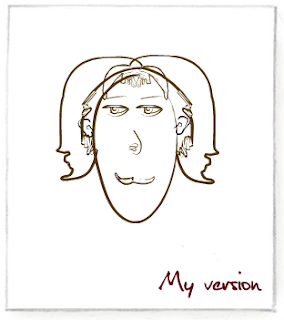

What did you do?
-I "tried" creating an image of myself and had my husband create one to using the picassohead.
What did you learn?
-I learned that I got frustrated using this assignment because I couldn't get anything to look like me.
How can you use the new learning?
-This is a fun assignment to see what students see themselves as.
NETS Standard
2. Design and Develop Digital-Age Learning Experiences and Assessments
Teachers design, develop, and evaluate authentic learning experiences and assessments incorporating contemporary tools and resources to
maximize content learning in context and to develop the knowledge, skills, and attitudes identified in the NETS•S. Teachers:
a. design or adapt relevant learning experiences that incorporate digital tools and resources to promote student learning and creativity
c. customize and personalize learning activities to address students’ diverse learning styles, working strategies, and abilities using
digital tools and resources
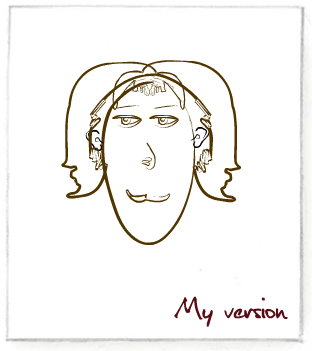

What did you do?
-I "tried" creating an image of myself and had my husband create one to using the picassohead.
What did you learn?
-I learned that I got frustrated using this assignment because I couldn't get anything to look like me.
How can you use the new learning?
-This is a fun assignment to see what students see themselves as.
NETS Standard
2. Design and Develop Digital-Age Learning Experiences and Assessments
Teachers design, develop, and evaluate authentic learning experiences and assessments incorporating contemporary tools and resources to
maximize content learning in context and to develop the knowledge, skills, and attitudes identified in the NETS•S. Teachers:
a. design or adapt relevant learning experiences that incorporate digital tools and resources to promote student learning and creativity
c. customize and personalize learning activities to address students’ diverse learning styles, working strategies, and abilities using
digital tools and resources
Snipping Tool

What did you do?
-Basically I took a picture of something on my computer using the snipping tool.
What did you learn?
-I learned that I can use the snipping tool to capture pictures on my computer so I can save something.
How can you use the new learning?
-I never knew I could do this until now. This is a really neat tool that you could use when giving directions/instructions to students. You could give step by step directions along with an image for them to understand. I chose this because it is easy to get to all my grad classes in an organized manner.
NETS Standard
2. Design and Develop Digital-Age Learning Experiences and Assessments
Teachers design, develop, and evaluate authentic learning experiences and assessments incorporating contemporary tools and resources to
maximize content learning in context and to develop the knowledge, skills, and attitudes identified in the NETS•S. Teachers:
a. design or adapt relevant learning experiences that incorporate digital tools and resources to promote student learning and creativity
3. Model Digital-Age Work and Learning
Teachers exhibit knowledge, skills, and work processes representative of an innovative professional in a global and digital society. Teachers:
d. model and facilitate effective use of current and emerging digital tools to locate, analyze, evaluate, and use information
resources to support research and learning
Friday, June 10, 2011
Reading Week 2
Here is my answers for Cone of Learning
Standard
5. Engage in Professional Growth and Leadership
Teachers continuously improve their professional practice, model lifelong learning, and exhibit leadership in their school and professional
community by promoting and demonstrating the effective use of digital tools and resources. Teachers:
a. participate in local and global learning communities to explore creative applications of technology to improve student learning
d. contribute to the effectiveness, vitality, and self-renewal of the teaching profession and of their school and community
Standard
5. Engage in Professional Growth and Leadership
Teachers continuously improve their professional practice, model lifelong learning, and exhibit leadership in their school and professional
community by promoting and demonstrating the effective use of digital tools and resources. Teachers:
a. participate in local and global learning communities to explore creative applications of technology to improve student learning
d. contribute to the effectiveness, vitality, and self-renewal of the teaching profession and of their school and community
Tuesday, June 7, 2011
Diigo - Social Bookmarking
A browser add on makes searching a lot easier and saves lots of time. It is a toolbar button that is a shortcut to search. They can provide multimedia or interactive animations. Examples of these include the ActiveX Controls, browser extensions, browser helper objects, etc. I've used the ActiveX Controls but I really never made much attention to it besides clicking to download it and that was it. The installation went pretty smoothly as far I remember. I would have to say the following would be the closest standard that would deal with this because it shows how we use the technology and be able to transfer over to a blog and share it with others.
What did you do?
-I registered for Diigo and installed it on my computer. Then I started building a library by adding websites each week.
What did you learn?
-I learned that by using this you can have all your most used websites right at hand so its once click away.
How can you use the new learning?
-We can save our most used websites on the computers at school so students can get into the website themselves.
3. Model Digital-Age Work and Learning
Teachers exhibit knowledge, skills, and work processes representative of an innovative professional in a global and digital society. Teachers:
a. demonstrate fluency in technology systems and the transfer of current knowledge to new technologies and situations.
1. Facilitate and Inspire Student Learning and Creativity
Teachers use their knowledge of subject matter, teaching and learning, and technology to facilitate experiences that advance student
learning, creativity, and innovation in both face-to-face and virtual environments. Teachers:
c. promote student reflection using collaborative tools to reveal and clarify students' conceptual understanding and thinking, planning, and creative processes.
Here is my Diigo page! Hope it works!
What did you do?
-I registered for Diigo and installed it on my computer. Then I started building a library by adding websites each week.
What did you learn?
-I learned that by using this you can have all your most used websites right at hand so its once click away.
How can you use the new learning?
-We can save our most used websites on the computers at school so students can get into the website themselves.
3. Model Digital-Age Work and Learning
Teachers exhibit knowledge, skills, and work processes representative of an innovative professional in a global and digital society. Teachers:
a. demonstrate fluency in technology systems and the transfer of current knowledge to new technologies and situations.
1. Facilitate and Inspire Student Learning and Creativity
Teachers use their knowledge of subject matter, teaching and learning, and technology to facilitate experiences that advance student
learning, creativity, and innovation in both face-to-face and virtual environments. Teachers:
c. promote student reflection using collaborative tools to reveal and clarify students' conceptual understanding and thinking, planning, and creative processes.
Here is my Diigo page! Hope it works!
Monday, June 6, 2011
Philosophy
https://docs.google.com/document/d/1mu99Ap7jk8XexRmukMzeIP0yB35d-3Tverc2PB4yVag/edit?hl=en_US
What did you do?
-I created a voki and then input my teaching philosophy.
What did you learn?
-I learned all about a voki and how much fun it was.
How can you use the new learning?
-We could use this in a number of ways. We could use this is we wanted to create a movie or video and let each student have part in it. We could also let students give speeches using this.
Standard
3. Model Digital-Age Work and Learning
Teachers exhibit knowledge, skills, and work processes representative of an innovative professional in a global and digital society. Teachers:
a. demonstrate fluency in technology systems and the transfer of current knowledge to new technologies and situations
c. communicate relevant information and ideas effectively to students, parents, and peers using a variety of digital-age media and formats

What did you do?
-I created a voki and then input my teaching philosophy.
What did you learn?
-I learned all about a voki and how much fun it was.
How can you use the new learning?
-We could use this in a number of ways. We could use this is we wanted to create a movie or video and let each student have part in it. We could also let students give speeches using this.
Standard
3. Model Digital-Age Work and Learning
Teachers exhibit knowledge, skills, and work processes representative of an innovative professional in a global and digital society. Teachers:
a. demonstrate fluency in technology systems and the transfer of current knowledge to new technologies and situations
c. communicate relevant information and ideas effectively to students, parents, and peers using a variety of digital-age media and formats
Subscribe to:
Posts (Atom)